Skip to Content
  • News
  • Events
  • Careers
  • Contact Us
MyTownship

Township of Langley Logo Township of Langley Logo

Contact Us
  • Services
    View all
    • Animal Control
    • Business
    • Bylaw Services
    • Community Support Services
    • Emergency Services and Safety
    • Garbage, Recycling and Green Cart
    • Online Services
    • Property Taxes
    • Report a Problem
    • Sustainability
    • Transportation and Roads
    • Utility Fees
    • Water
    Report a Problem
    Report a ProblemHow can we help?
  • Parks &
    Recreation
    View all
    • Activities and Programs
    • Facilities and Arenas
    • Get Involved
    • Parks, Trails and Amenities
    • Recreation Registration
    Recreation Registration
    Recreation RegistrationDiscover our programs and activities for all ages.
  • Arts &
    Culture
    View all
    • Events
    • Grants and Incentives
    • Learning, Classes and Programs
    • Libraries
    • Museum and Heritage
    • Public Art
    • salishan Place by the River
    • Ask a Question
    Events
    EventsExplore events in the Township.
  • Building &
    Development
    View all
    • Building
    • Capital Projects
    • Development
    • Engineering Forms and Guides
    • Environment
    Development information
    Development informationAccess guides, policies, bylaws, forms, and other information.
  • Connect
    View all
    • Ask a Question
    • Contact Us
    • Freedom of Information and Data Use
    • Get Involved
    • Locations, Maps and Data
    • News, Events and Media
    • Report a Problem
    • Stay Connected
    Careers
    CareersExplore our employment opportunities.
  • The Township
    View all
    • About the Township
    • Elections
    • Grants and Incentives
    • Mayor and Council
    • Notice of Claim
    • Plans, Reports, and Strategies
    • Public Notices
    • Social Sustainability
    • Township Divisions
    • YNJ Langley Airport
    Public Engagement
    Public EngagementLearn about and engage with us on a variety of topics.

HomeParks & RecreationRecreation RegistrationRegister for a Program Guide
  • Facebook
  • Twitter
  • LinkedIn
  • Email

Register for a Program Guide

 
Signing up for a program can be completed by following the steps below.
Step 1

From the Recreation Registration page, tol.ca/recregister, scroll down and click the Sign in to your account button.

Step 1

Tip:  To browse programs without logging into your Recreation Registration account, select the Programs and swimming lessons button from the Registration Links section above.

Step 2

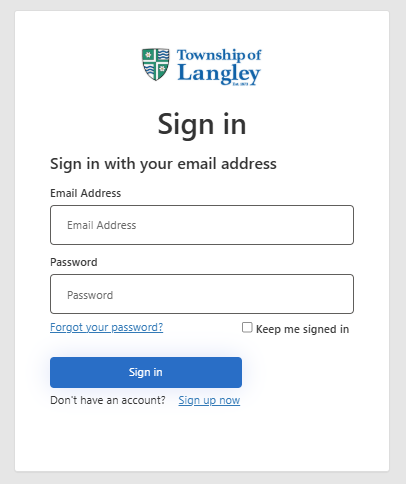
Enter your email and password, then click the Sign in button.

Step 2

Step 3

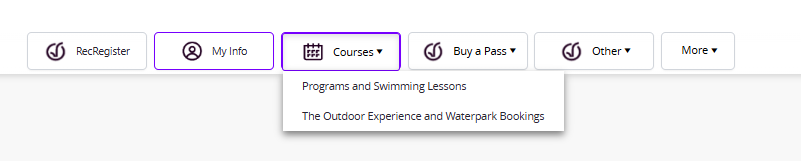
Your Client Details page will appear when signed in. Click Courses and select the category that you would like to browse for upcoming programs.

Step 3

Step 4

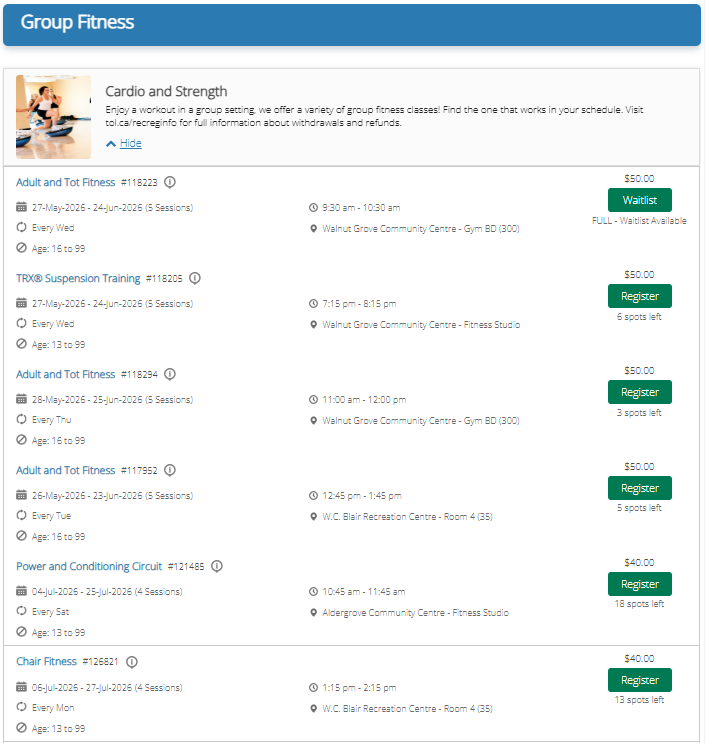
Select the category and click Show to view courses are each section. Click on the Register, Waitlist or More Info button to proceed. 

Step 4

Note: The Register button will be available when registration is open. If the class is full the button will show Waitlist. If registration has not yet opened, the button will show More Info.

Step 5

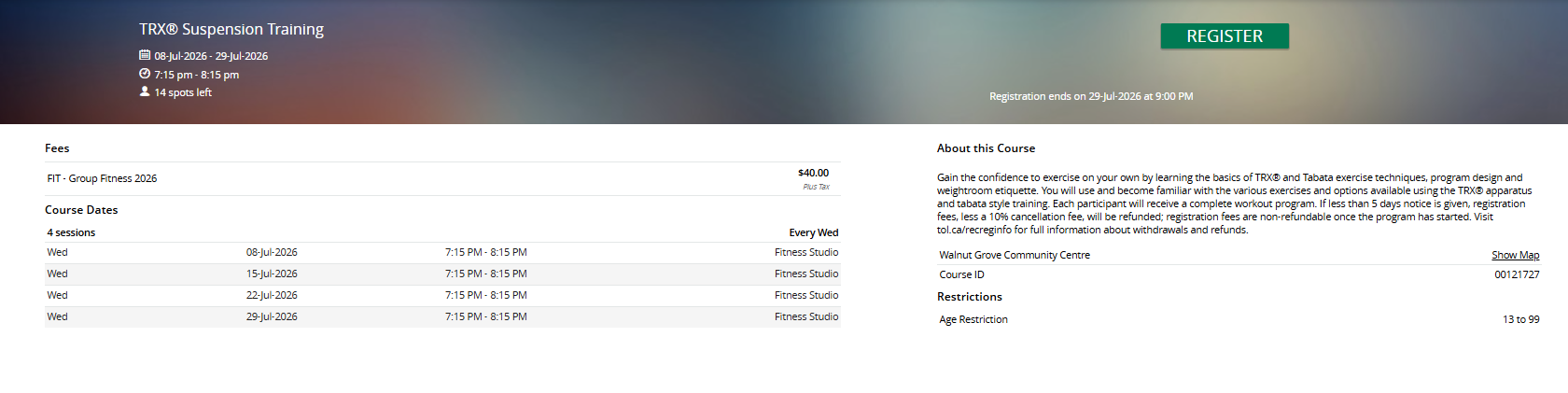
The class details will appear. Pricing, all session dates, and more details about the class, including the class’s location will appear on the web page. Click Register to start the sign-up process. 

Step 5

Step 6

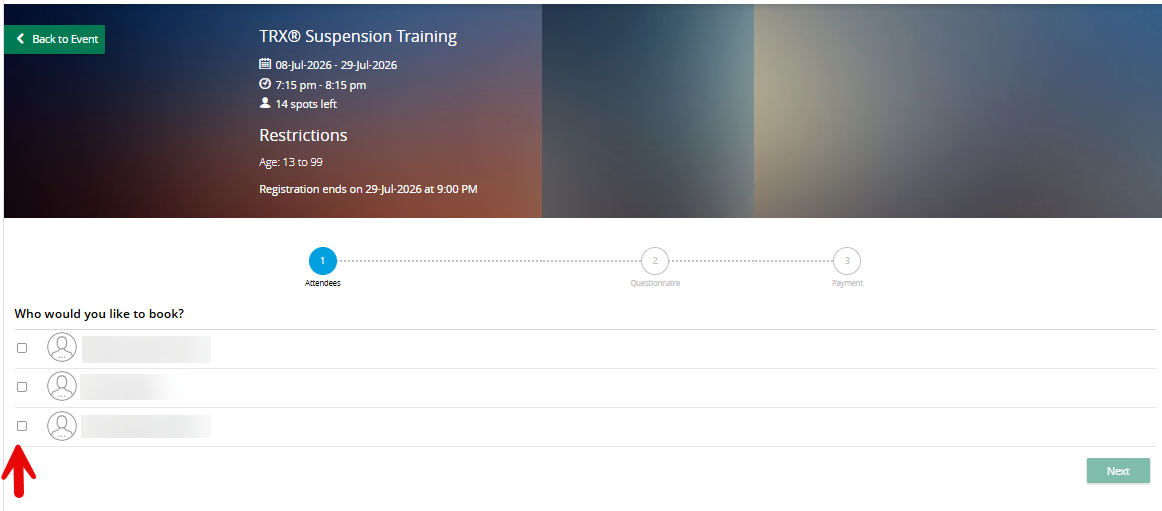
Select yourself or the person in your household that would like to attend the class. Click Next.

Note: If a family member is not eligible for a course they will be greyed out. Text indicating why they are not eligible will be in red. Contact any recreation centre to correct any account errors.

Step 6

Step 7

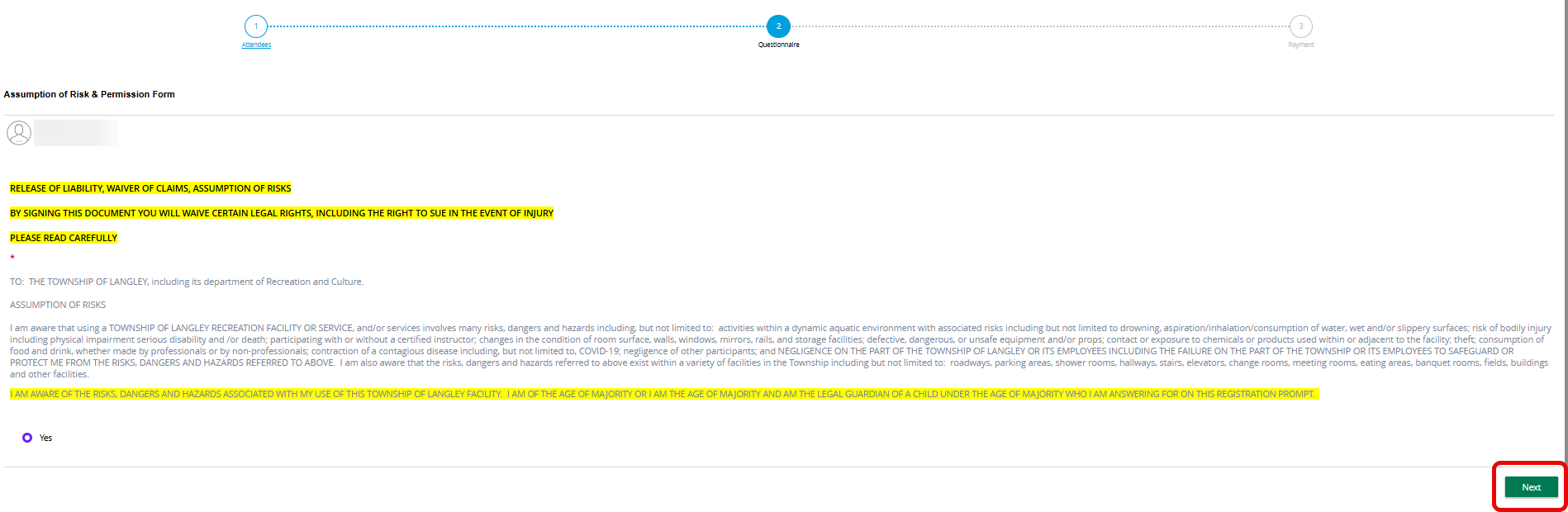
For some programs, a questionnaire will appear. Click Yes to agree to the terms and complete all following questions if applicable. Click Next to proceed.

Step 7

Step 8

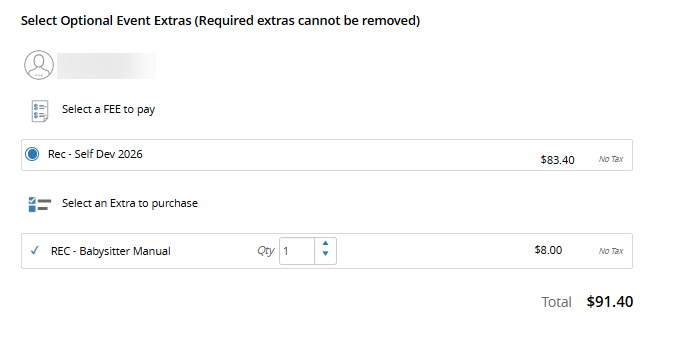
The fees associated with the program will appear. Extra fees that apply will also be displayed.

Step 8

Step 9

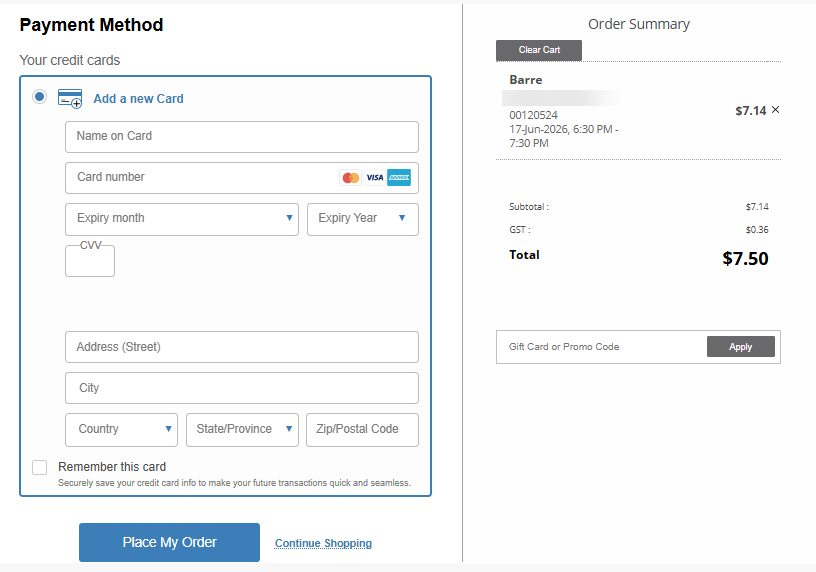
Ensure your order summary is accurate, enter credit card details and click Place My Order. You may also select a previously saved credit card or account credit for payments.

Tip: Click Remember this card to store your credit card details for future registrations.

.Step 9

Note: If you would like to register for additional programs, click Continue Shopping and add additional programs as needed. Click Place My Order when you are ready to checkout and pay.

Step 10

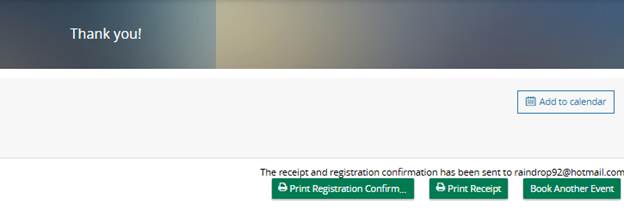
Registration in the program is confirmed. You will be given the option to print your confirmation.

Ensure you review your registration confirmation for withdraw information and any dates that your program may not be running.

Step 10

  • Recreation Registration
    • Registration Help
    • ​​Recreation Account Setup​ Guide
    • Register for a Drop-in Class Guide
    • Register for a Program Guide
    • Confirm or Decline a Spot on a Waitlist Guide
    • Withdraw Online from a Recreation Program Guide
  • View full Parks & Recreation Menu
    • Activities and Programs
      • Active Beyond the Bell
      • Admission Fees
      • Birthday Parties
      • Camps
      • Cancellations and Refunds
      • Drop-in Schedules
        • Activities and Sports Drop-in Schedule
        • Aquatic Fitness Drop-in Schedule
        • Events
        • Fitness Drop-in Schedule
        • Skating and Stick and Puck Drop-in Schedule
        • Swimming Pool Schedules
      • Fitness
      • Licensed Preschools
      • Recreation Registration
      • Skating
      • Swimming
    • Facilities and Arenas
      • Arenas
      • Community and Recreation Centres
        • Aldergrove Community Centre
          • The Outdoor Experience
            • Height and Weight Restrictions
            • Hours of Operation
            • Reservable Group Areas
            • Slides and Attractions
            • Special Events
            • Things To Know
            • Waterpark Admission Fees
        • George Preston Recreation Centre
        • W.C. Blair Recreation Centre
        • Walnut Grove Community Centre
      • Facility Rentals
      • Swimming Pools
    • Get Involved
    • Parks, Trails and Amenities
      • Cycling and Trails
      • Donation Program
      • Field Status
      • Parks and Amenities
      • Picnic Shelters
      • Spray Parks
Subscribe to page updates

Township of Langley footer logo

Civic Facility
20338 – 65 Avenue
Langley, BC V2Y 3J1

Phone: 604-534-3211

Contact Us

  • Resources

    • Careers
    • Maps & GeoSource
    • Media Inquiries
    • MyTownship Account
    • Online Services
    • Open Data Portal
    • Traffic Impacts
  • Our Websites

    • Township of Langley
    • salishan Place - Arts, Culture & Heritage Ctr
    • Fire Department
    • Langley Airport (YNJ)
    • Tourism Langley

Connect with us

  • View our Facebook Page
  • View our Instagram Page
  • View our Twitter Page
  • View our YouTube Page
  • View our LinkedIn Page

Subscribe to Newsletter

Copyright © 2026 Township of Langley

  • Privacy & Freedom of Information
  • Terms of Use
  • Sitemap
  • Website Feedback

Browser Compatibility Notification

It appears you are trying to access this site using an outdated browser. As a result, parts of the site may not function properly for you. We recommend updating your browser to its most recent version at your earliest convenience.